CV Checker
Your CV, read the way a UK recruiter reads it
Pick a sponsored job or paste any advert. We mark your CV up line by line, quote what the advert says about visa sponsorship, check the employer on the Home Office sponsor register, and flag the things UK employers expect you to leave out, like your date of birth. Then fix it on real A4 pages and download it as Word.
Check my CV free
No account needed. Your file is never stored.
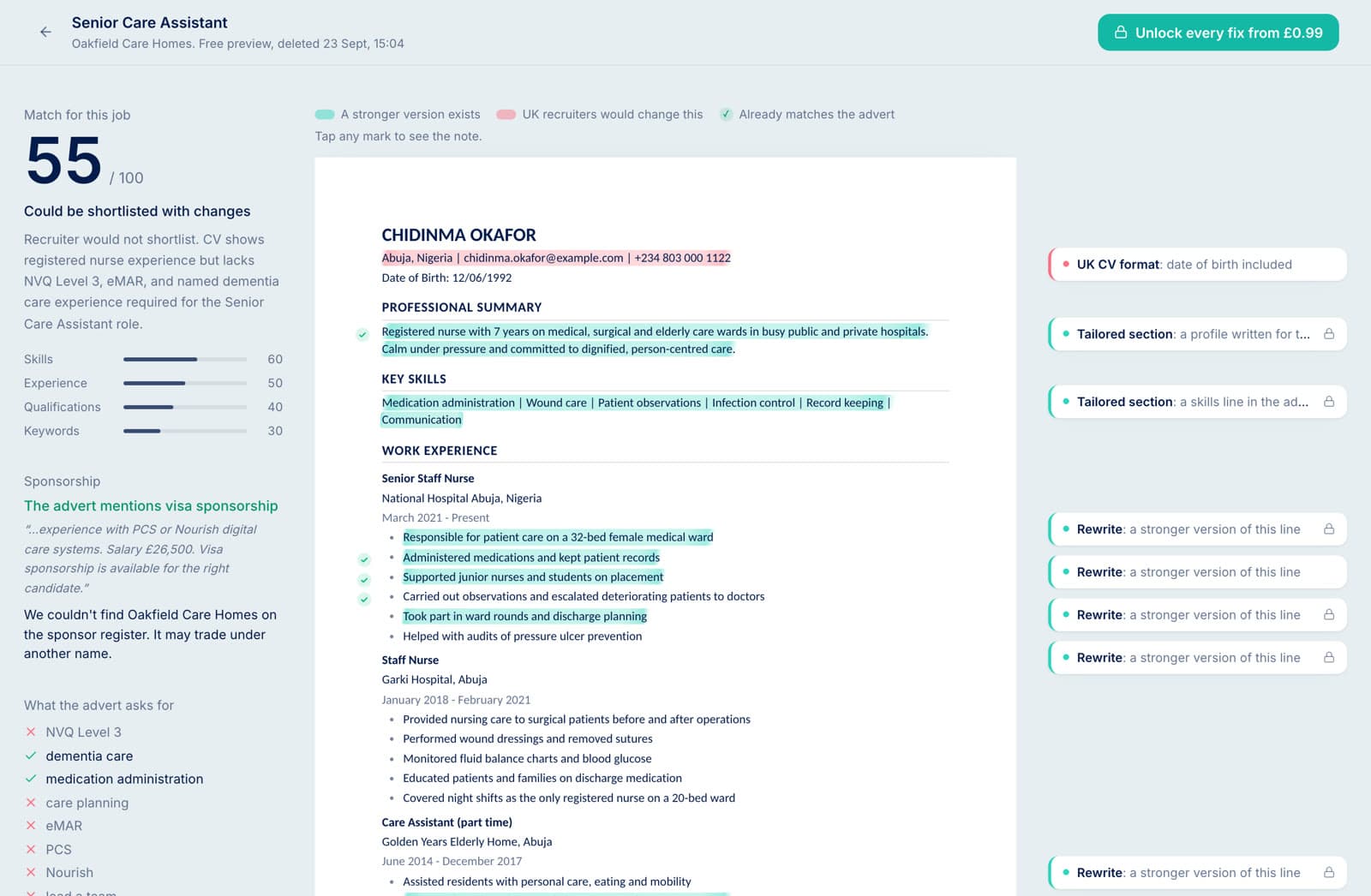
Every note is pinned to a line you wrote
Teal marks a line that could be stronger for this job. Pink marks something a UK recruiter would change. A tick means the line already matches the advert. On the left you see the score, the sponsorship wording quoted from the advert, whether the employer is on the Home Office sponsor register, and the advert's requirements your CV hasn't shown yet.
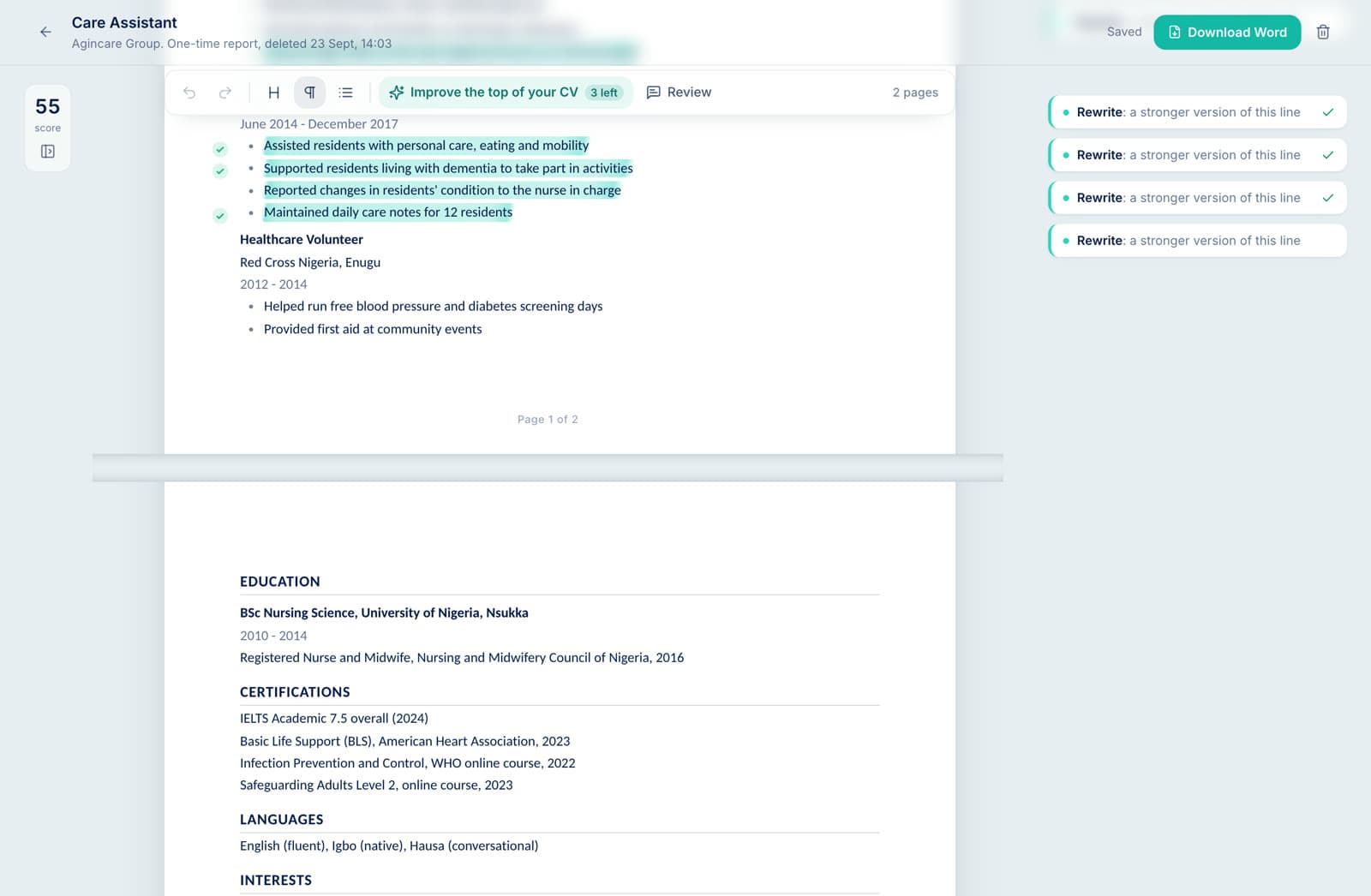
Edit it on the page it will be printed on
Your CV opens on A4 sheets with Word's margins and font size, numbered at the foot of each page. Job titles go bold and dates go grey, the way a UK recruiter expects to scan them. When a fix pushes you onto a third page, you see it straight away: most UK employers want two.
Apply a fix with one click, type over anything, then download a Word file that matches what you saw.
AI rewrites a section. You decide what stays.
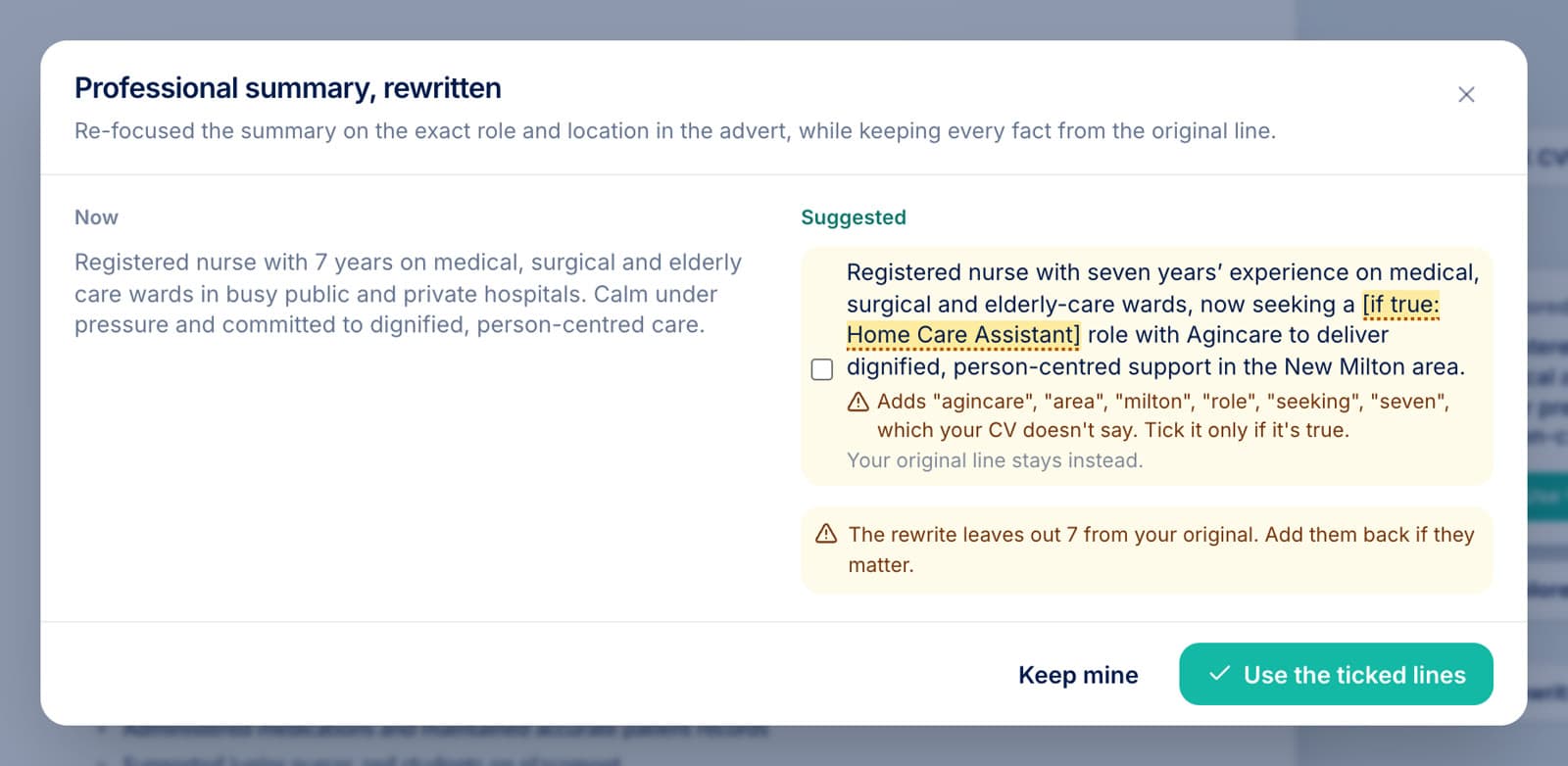
Put your cursor in any section and choose Improve. The rewrite appears next to your original, line by line. Most AI CV tools pad your CV with the advert's duties, and recruiters spot it at interview. Here, a line that claims something your CV never said, like leading a team, arrives unticked and flagged. Leave it unticked and your own line stays.
Skills the advert wants but your CV doesn't mention show up as [if true: eMAR]. They stay out of your download until you say yes.
No job in mind yet? Check the CV on its own
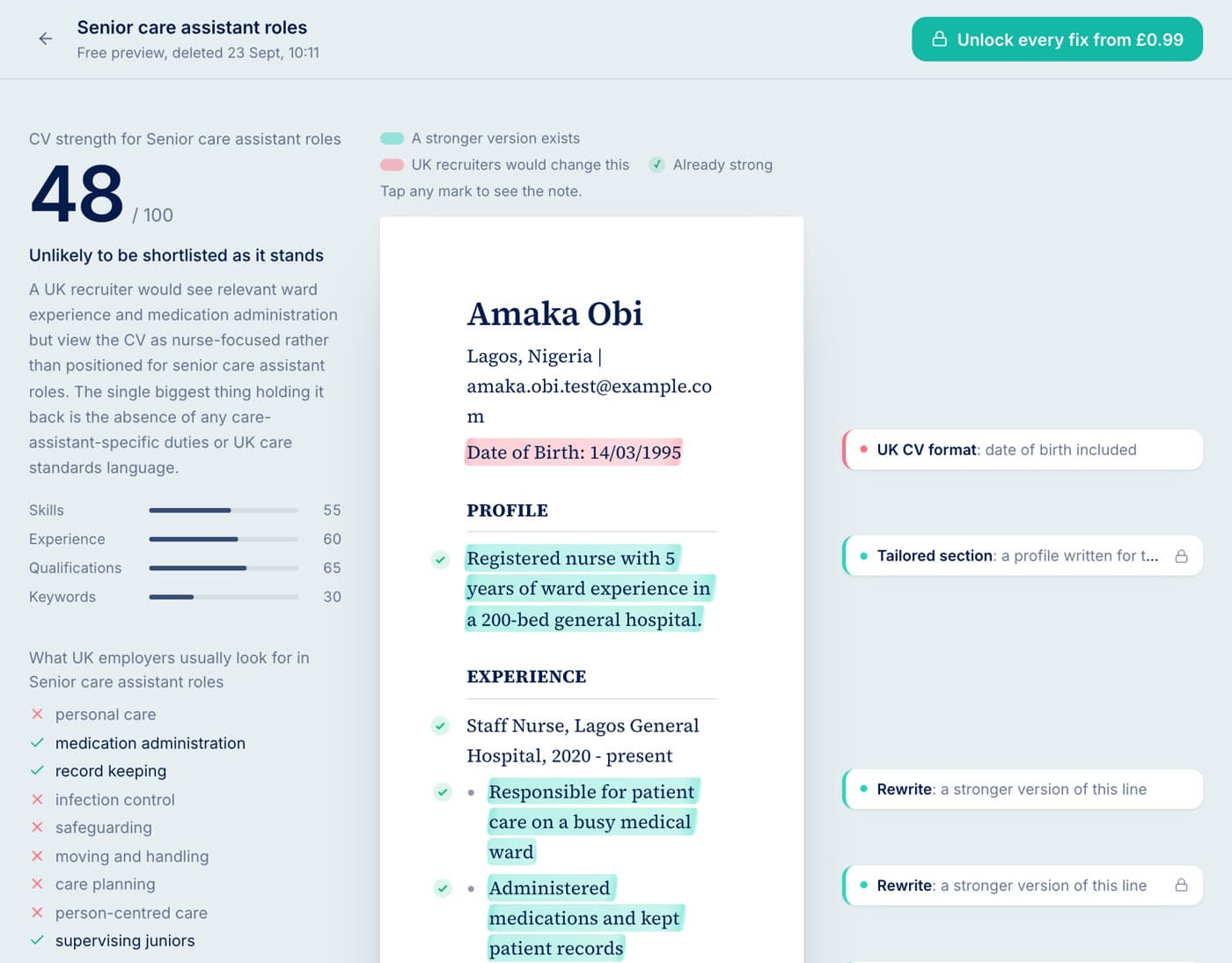
Choose “No job yet” and tell us the kind of role you are aiming for. You get the same markup, judged against UK CV conventions and what employers in that field usually ask for. Once you find an advert, check again against it.
Find a sponsored job, then check your CV against it
Every listing on our sponsored jobs board has a “Check my CV” button that fills in the advert for you. The employer's sponsor-register status comes with it.
Check free. Pay once for the fixes you want.
Prices are in your local currency and charged once through Stripe. No subscription, nothing renews.
Free check
£0
No account
- Match score and verdict
- Every line marked up
- Sponsorship wording from the advert
- UK format problems
- One fix written out
One-time report
£0.99
No account, deleted 1 hour after paying
- Every fix, written out
- Edit on A4 pages, download Word
- 3 AI section edits
Job pack
£1.99
Saved 30 days in your account
- Everything in the one-time report
- 3 re-checks to watch the score move
- Check the same CV against other jobs
5 job packs
£5.99
£1.20 a job
- For a week of applications
- Use one per job, whenever you like
Need more AI edits?
- 3 credits an edit
- When you're signed in, pay for one more from your ImmigrationGPT credits. New accounts start with free credits.
- 5 more for £0.99
- A top-up for any unlocked report, no account needed. On a job pack it adds 5 re-checks too.
An AI edit that changes nothing isn't counted.
Questions people ask first
Is the check really free?
Yes. Upload your CV, pick a job or skip that step, and you get a score, the full markup on your CV and one fix written out in full. Paying unlocks the rest of the fixes and the editor.
Do I need a job advert?
No. Choose "No job yet", optionally type the kind of role you want, and we check the CV against UK conventions and what employers in that field usually look for. When you find a real advert, check again against it; that result is more precise.
Do you keep my CV?
We never store the file you upload. We keep the text we read from it for 2 hours on a free check, 60 minutes after a one-time report, or 30 days if you buy a job pack and sign in. You can delete a report at any time.
Will it make things up to boost my score?
It is built not to. Every rewrite has to start from a line that is already in your CV. If an advert asks for something your CV never mentions, such as eMAR or NVQ Level 3, the suggestion shows it as "if true" and you must confirm it before it goes into your download.
What is an AI edit?
In the editor, put your cursor in any section and choose Improve or Review. Improve rewrites that section and shows it next to your original; you tick the lines you want. Review gives you a recruiter's notes on it. Every unlocked report includes 3. If an edit changes nothing, it isn't counted.
What happens when I run out of AI edits?
If you are signed in, each extra edit costs 3 ImmigrationGPT credits, and new accounts start with free credits. Or buy a top-up of 5 more edits for 99p (in your currency), no account needed.
Will my CV look the same in Word?
Yes. The editor shows your CV on A4 pages with the same margins and font size as the Word file you download, so if it says 2 pages, Word will too. Most UK employers expect 2 pages, and the editor tells you when you go over.
Does it tell me if the employer can sponsor a visa?
It quotes what the advert itself says about sponsorship or right to work, and checks the employer name against the Home Office register of licensed sponsors. Being on the register does not mean a particular job will be sponsored, so read the advert and ask the employer. Search any employer in the UK sponsor licence checker.
Does it work for Skilled Worker visa jobs?
Yes. Pick a Skilled Worker job from our sponsored jobs board or paste its advert. The check marks your CV up against that advert, quotes what it says about sponsorship and checks the employer on the Home Office register. It checks your CV, not whether you meet the visa requirements.
Is this immigration advice?
No. The CV Checker comments on your CV and quotes public information. For advice on your own immigration situation, speak to an adviser registered with the Immigration Advice Authority (formerly OISC) or a solicitor.